Showing posts with label promo. Show all posts

Jan 23, 2013

Kimstore 5,000 Off Promo

Posted Jan 23, 2013

Kimstore is on sale! 5,000 Pesos off on available items with a minimum purchase of P20,000. The promo is up to January 31. [Update] Kimstore announced that the promo is only until January 24.


Mechanics

1. Check with Kimstore first if item is available [Important].
-You can probably contact her on her phone or Facebook chat or Twitter. See below for contact details.

2. At Kimstore Multiply Website, click BUY NOW button beside the item you want to buy.

3. Proceed with checkout and enter email address.

4. Enter the discount code PH-GADGET5KOFF

5. Select payment option and enter shipping address.

Notes

1. You may participate in the promo with or without Multiply ID.

2. Make sure you enter the proper discount code, capitalization and all.

3. For BDO and BPI bank deposits, provide 1 whole business day to verify payments. Credit card payments take 2-3 days.

4. Unit will be shipped via LBC.

5. Promo is valid only for shipping. Meetups are not part of the promo.

6. Promo is valid of items worth 20,000 Pesos and up.

Contact Details:
Kimstore
Mobile: 0905 320 1818 , 0922 885 9799 , 0908 886 9799
Facebook: http://facebook.com/kimstorePH

Give your complete name, order and contact number when you're contacting her.

Dec 19, 2012

How to Avail the 10% Discount in Beyond the Box stores

Posted Dec 19, 2012
To avail the 10% discount in Beyond the Box stores, you just need to post a Facebook status and tweet the ff:

I am in my favorite Apple Premium Reseller store in the metro, Beyond the Box at One Rockwell

or whatever store you're at, e.g. Resorts World Manila. Happy shopping!


Nov 26, 2012

iPhone 5 Release Date in the Philippines

Posted Nov 26, 2012
Based on rumors and a "reliable" source, Apple's iPhone 5 is said to be released on December 15, 2012 here in Manila. It didn't say which telecom it will come from nor the time and place of the launching. Take it with a pinch of salt.


Meanwhile, the Samsung Galaxy Note II promo of Globe is very popular. I see many of my friends availing it. As for the SIII, I don't see any promos yet probably because it's arguably the most wanted phone right now.

[Update] iPhone 5 is now confirmed to be released on the Philippines on December 14, 2012.


Galaxy Note II Promo from Globe and Smart

You can avail of the Samsung Galaxy Note II from Globe which comes with a Plan 999 contract locked for 2 years, and additional P700 per month. In total that's *1699 per month you will be paying to get this promo.


Globe's Plan 999 includes

  • Unlimited mobile surfing for 24 months
  • 200 SMS and 10 minutes of calls to Globe/TM

*P16,800 cashout at Plan 999 is payable at 0% 24 months installment payment via credit card.
I wonder if there's any discount if you use cash instead of credit card.

Here's the link to the Globe promo.

Smart is also offering Note 2 in their plan 2000. Samsung will enjoy the sales while the Philippines wait for the arrival of iPhone 5 which is said to be released soon.

Galaxy Note II Specifications:


BODY
Dimensions
151.1 x 80.5 x 9.4 mm (5.95 x 3.17 x 0.37 in)
Weight
183 g (6.46 oz)

- Touch-sensitive controls
- S Pen stylus

DISPLAY
Type
Super AMOLED capacitive touchscreen, 16M colors
Size
720 x 1280 pixels, 5.5 inches (~267 ppi pixel density)
Multitouch
Yes
Protection
Corning Gorilla Glass 2

MEMORY
Card slot
microSD, up to 64 GB
Internal
16/32/64 GB storage, 2 GB RAM

DATA
GPRS
Yes
EDGE
Yes
Speed
HSDPA, 42 Mbps; HSUPA, 5.76 Mbps; LTE, Cat3, 50 Mbps UL, 100 Mbps DL
WLAN
Wi-Fi 802.11 a/b/g/n, dual-band, DLNA, Wi-Fi Direct, Wi-Fi hotspot
Bluetooth
Yes, v4.0 with A2DP, LE, EDR
NFC
Yes
USB
Yes, microUSB (MHL) v2.0, USB Host support

CAMERA
Primary
8 MP, 3264x2448 pixels, autofocus, LED flash
Features
Simultaneous HD video and image recording, geo-tagging, touch focus, face and smile detection, image stabilization
Video
Yes, 1080p@30fps
Secondary
Yes, 1.9 MP


FEATURES
OS
Android OS, v4.1.1 (Jelly Bean)

Chipset
Exynos 4412 Quad

CPU
Quad-core 1.6 GHz Cortex-A9

GPU
Mali-400MP

Sensors
Accelerometer, gyro, proximity, compass, barometer

Messaging
SMS(threaded view), MMS, Email, Push Mail, IM, RSS

Browser
HTML5

Radio
Stereo FM radio with RDS

GPS
Yes, with A-GPS support and GLONASS

Java
Yes, via Java MIDP emulator

Colors
Titanium Gray, Marble White


BATTERY

Standard battery, Li-Ion 3100 mAh
Stand-by
Up to 980 h (2G) / Up to 890 h (3G)
Talk time
Up to 35 h (2G) / Up to 16 h (3G)


Nov 24, 2012

Free Movie on December 8 Courtesy of SM Digital Cinemas

Posted Nov 24, 2012
If you go to SM's e-Plus Facebook page from November 22 - December 6, 2012, you can avail this free movie pass to any digital theater of SM nationwide. Just click on the Free Movie Day app, like the page and complete the registration.

Go to Facebook.com/eplus.sm

The movies included in this event are: House at the End of the Street, Stolen, Deadfall, Step Up: Revolution, Himala and Supremo: The Andres Bonifacio Story. Frankly, none of the films interests me but nothing beats a free movie. Unfortunately, I have to be somewhere on this date. Knowing how Pinoys crave for free stuff, it is highly likely that SM Digital Cinemas will be jam-packed on that day.


As a side note, I'll share how I bought my SM Cinema tickets online today.

Ayala's SureSeats started online reservation and payment way before SM did, but I find their system not user-friendly. If you just reserve the tickets in SureSeats, you need to be at least 45 minutes before the movie starts or else they will sell your slot to someone else. If you don't want that hassle, you have to purchase the ticket which requires you to be registered first with MPass. MPass is an additional registration on top of your registration with Sureseats; again, another hassle. I don't know if they still operate this way, but that was my experience before.

Fortunately, SM did not make the same mistake. All I needed was to register and purchase with my credit card. Unlike in sureseats, there's no need for additional steps, and no need to hurry up because you already bought the ticket.


How to purchase SM Cinema tickets online

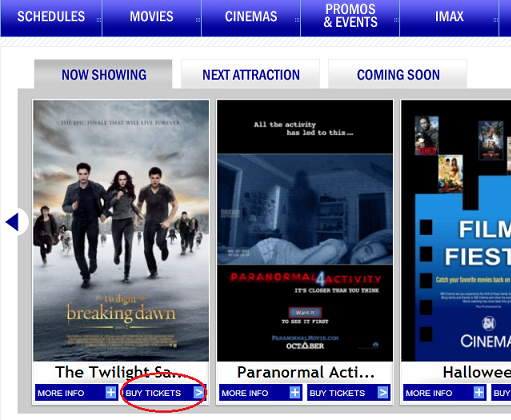
  1. Go to smcinema.com and select the movie you want

    In this case, I clicked "Buy Tickets" for the movie Twilight, lol! :))
             
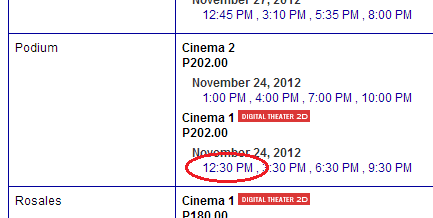
  2. Select the desired cinema and time

    Selected Podium, 12:30PM
                               
  3. If it is your first time, just register, else you can proceed with login
    If it's your first time, register first.


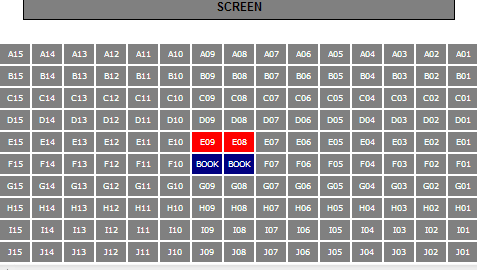
  4. Reserve a seat, choose the credit card option and click Purchase


    The screen is on top. Red ones are taken and gray ones are available.

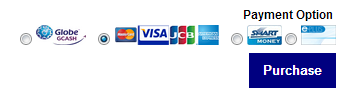
    Select the credit card option (middle) and click Purchase!

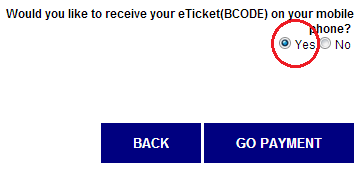
  5. In the confirmation screen, it is worth noting to choose to receive your eTicket code in your mobile phone. This option is the least troublesome since you only need the text message sent to you to claim your tickets.

    Select Yes to receive your ticket code in your mobile phone

  6. Proceed with the credit card payment. You will receive a text message afterwards and you can use this to claim your tickets in the selected cinema.


That was relatively easy. The tickets were claimed successfully and the movie was great. No need to fall in line; it is a good life. Happy watching!